Main content
Quick Reference Guide
How to Check Notifications
VITALsync How To | Check Your Notifications
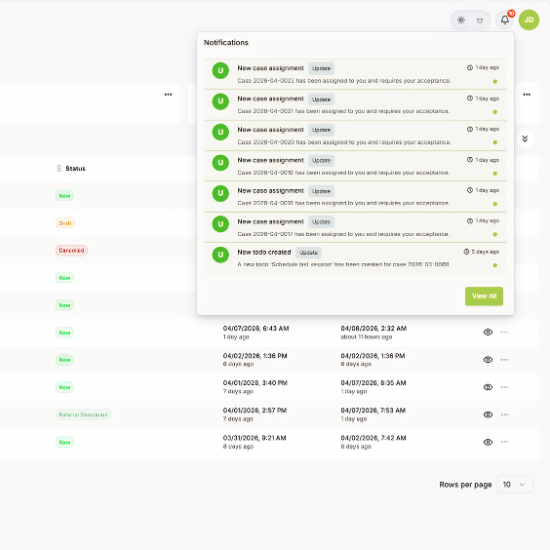
When you are assigned a new case, you receive a system notification through the bell icon and an email. Here is how to find and open them.
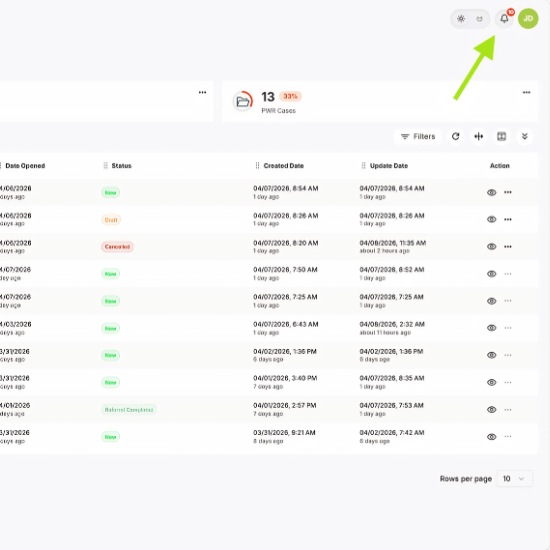
Find the Bell Icon
1. Look for the bell icon in the top-right corner of any screen.
2. The badge count shows how many unread notifications you have.
Open Your Notifications
1. Click the bell icon to open the notification list.
2. Each entry shows the case number and confirms it requires your attention, whether it being accepting/rejecting a case or some type of action update.
3. Click any notification to go directly to that case.
| Tip: You also receive an email notification to the address on your provider profile, so you will know about new referrals even when you are not logged in. |